A computer first introduced by Apple in 1984 with the now famous 1984 commercial shown on the Super bowl. The
Apple Macintosh computer became popular with schools and many
users because of the graphical user interface (GUI) that was easier for
non-computer users to use as it did not require memorizing many commands
like that on the PCs at the time using MS-DOS.
Thursday, December 15, 2011


AIM
- Short for AOL Instant Messenger, AIM is a widely used Instant Messenger program.
The official AIM website can be found at: http://www.aim.com/ - Short for Apple, IBM, and Motorola, AIM is the alliance that developed the PowerPC.
Apple definitions
Mac
- Originally known as iTools, .Mac is a group of online services from Apple computers that gives Apple Mac OS users a place to host their web page, e-mail, store files online, greeting cards, and a website review service. On June 09, 2008 Apple announced .Mac would be converted to MobileMe.
- A file extension for MacPaint files.
About attrib
Attrib allows a user to change the properties
of a specified file. Using attrib, the user has the capability of changing the
file to have any of the below attributes. Note if you're wanting to change the
ACL's of a file see the CACLS command.
Read-only - allowing the file to be only viewed and not written to.
Archived - allowing Microsoft backup and other backup programs to
know what files to backup.
Hidden - making the file invisible to standard users.
System - making the file an important system file.
The attrib.exe command is an external command that is available in the below
Microsoft operating systems.
MS-DOS
3.0 and above
Windows 95
Windows 98
Windows ME
Windows NT
Windows 2000
Windows XP
Windows Vista
Windows 7
Windows 95
Windows 98
Windows ME
Windows NT
Windows 2000
Windows XP
Windows Vista
Windows 7
Microsoft Windows 95, 98, and ME
syntax
Displays or changes file attributes.
ATTRIB [+R | -R] [+A | -A] [+S | -S]
[+H | -H] [[drive:][path]filename] [/S]
+
|
Sets an attribute.
|
-
|
Clears an attribute.
|
R
|
Read-only file attribute.
|
A
|
Archive file attribute.
|
S
|
System file attribute.
|
H
|
Hidden file attribute.
|
/S
|
Processes files in all directories
in the specified path.
|
Microsoft Windows 2000 and Windows
XP syntax
Displays or changes file attributes.
ATTRIB [+R | -R] [+A | -A ] [+S |
-S] [+H | -H] [[drive:] [path] filename] [/S [/D]]
+
|
Sets an attribute.
|
-
|
Clears an attribute.
|
R
|
Read-only file attribute.
|
A
|
Archive file attribute.
|
S
|
System file attribute.
|
H
|
Hidden file attribute.
|
/S
|
Processes files in all directories
in the specified path.
|
/D
|
Process folders as well.
|
Microsoft Windows 2000 and Windows
XP recovery console syntax
Note: The below options are the available options in the Windows recovery console.
Changes attributes on one file or
directory.
ATTRIB -R | +R | -S | +S | -H | +H |
-C | +C filename
+
|
Sets an attribute.
|
-
|
Clears an attribute.
|
R
|
Read-only file attribute.
|
S
|
System file attribute.
|
H
|
Hidden file attribute.
|
C
|
Compressed file attribute.
|
attrib
Typing attrib by itself will display
all files in the current directory and each of their attributes. If any file is
hidden it will also display those files.
attrib +r autoexec.bat
Add the read-only attribute to the
autoexec.bat file so it cannot be modified until the read only attribute is
taken off. This is helpful for important system files or any other file that
you do not want to have mistakenly edited or changed by another program.
attrib +h config.sys
Add the hidden attribute to the
config.sys file causing it to be not be seen by the average user.
attrib -h config.sys
This command will do the opposite of
the above command. Instead of hiding the file it will unhide the file if
hidden.
DOS directory file attribute bit
position and Hex Value with bit positions (7 6 5 4 3 2 1 0).
See the file attributes computer dictionary definition
for further information about file attributes.
Bit Positions
|
Hex
|
Description
|
0 0 0 0 0 0 0 1
|
01h
|
Read Only file
|
0 0 0 0 0 0 1 0
|
02h
|
Hidden file
|
0 0 0 0 0 1 0 0
|
04h
|
System file
|
0 0 0 0 1 0 0 0
|
08h
|
Volume Label
|
0 0 0 1 0 0 0 0
|
10h
|
Subdirectory
|
0 0 1 0 0 0 0 0
|
20h
|
Archive
|
0 1 0 0 0 0 0 0
|
40h
|
Reserved
|
1 0 0 0 0 0 0 0
|
80h
|
Reserved
|
Examples
|
||
0 0 1 0 0 0 0 1
|
21h
|
Read Only, Archive
|
0 0 1 1 0 0 1 0
|
32h
|
Hidden, Subdirectory, Archive
|
0 0 1 0 0 1 1 1
|
27h
|
Read Only, Hidden, Archive
|
Friday, December 9, 2011
Subscribe to:
Posts (Atom)
About mumbai film city
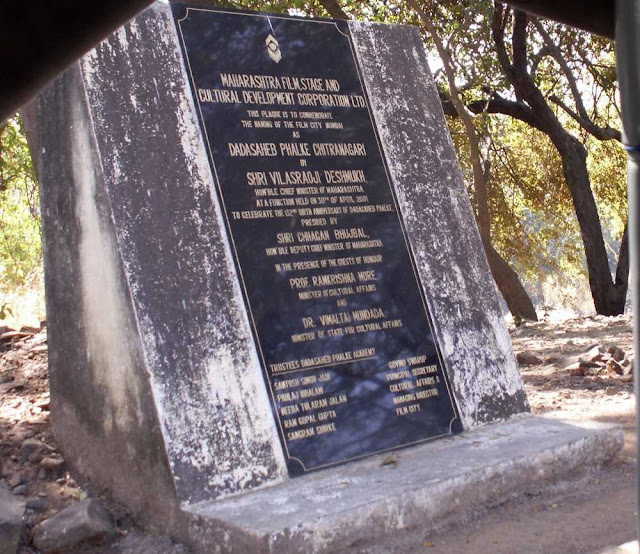
Film City, Mumbai Located in a secluded area in the vicinity of Aarey Colony, Mumbai , Film City is often regarded as a home ...
-
Swami Ramdev (1965 - ), also known as Baba Ramdev, is an Indian, Hindu swami. He is particularly well-known for his efforts in popularizing ...
-
 The origin & history of Lucknow is truly intriguing not just to the historians but also to the common man. The history of Lu...
 -
1942 FEB.15 Capture of Singapore by the Japan forces. Formation of Indian National Army by Subhash chandra Bose. MAY.3 Battle of Coral ...